By default Quick Launch is disabled in Windows 7. This will show you how to enable or disable Quick Launch on the taskbar in Windows 7 as a toolbar with small or large icons.
Quick Launch is used to open a program quickly from a shortcut on the taskbar. In this case in a toolbar The Quick Launch folder is located at the hidden system folder location (step 2) of:
C:\Users\(user-name)\AppData\Roaming\Microsoft\Internet Explorer\Quick Launch
Showing posts with label windows 7. Show all posts
Showing posts with label windows 7. Show all posts
8.11.09
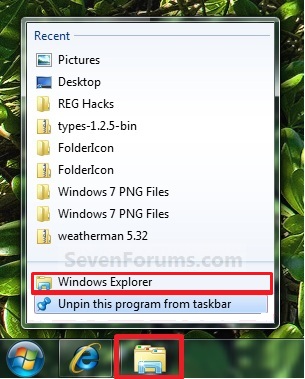
Windows Explorer Taskbar Icon - Change Open To Target
1. Right click on the pinned Windows Explorer taskbar icon, then right click on Windows Explorer in the Jump List and click on Properties. (See screenshot below)


18.10.09
Setup VPN Server/Client in Windows 7
Following are the steps for configuring Incoming VPN Connection in Windows 7
Following are the steps for configuring Outgoing VPN Connection in Windows 7
- First go to Control Panel and open Network and Sharing Center.
- Click on Change adapter settings.
- Press Alt+F and select New Incoming connection
- Put a check on who you’d like to give access to this computer or you can configure a new account by clicking on Add someone,after that click on Next.
- Put a check mark on Through the Internet. Click on Next.
- Select the protocols you want to enable for this connection. Click on Allow access.
- Make a note of the Computer name as this will be used by the client to connect to this computer and after that Click on Close.
Following are the steps for configuring Outgoing VPN Connection in Windows 7
- First go to Control Panel and open Network and Sharing Center.
- Click on Set up a new connection or network.
- Select Connect to a workplace then click on Next.
- Select Use my internet connection (VPN).
- Type the IP address or computer name where you wish to connect and your connection name under the Destination name field.
- Enter a User name and password that has been granted access to the host computer.
- For getting connected through created VPN connection, you can either right-click on the Network icon in the system tray and select Network and Sharing Center or go to Control Panel and open Network and Sharing Center, and click on Connect to a network.
- Now connect VPN Connection windows will appears.
Subscribe to:
Posts (Atom)
